SEO Tips: 13 Proven Strategies to Boost Your Search Rankings
What Are the Top 5 SEO Strategies? Before diving into all 13 tips, here's a direct answer to one of the most common questions about SEO tips : the five m...
What Are the Top 5 SEO Strategies?

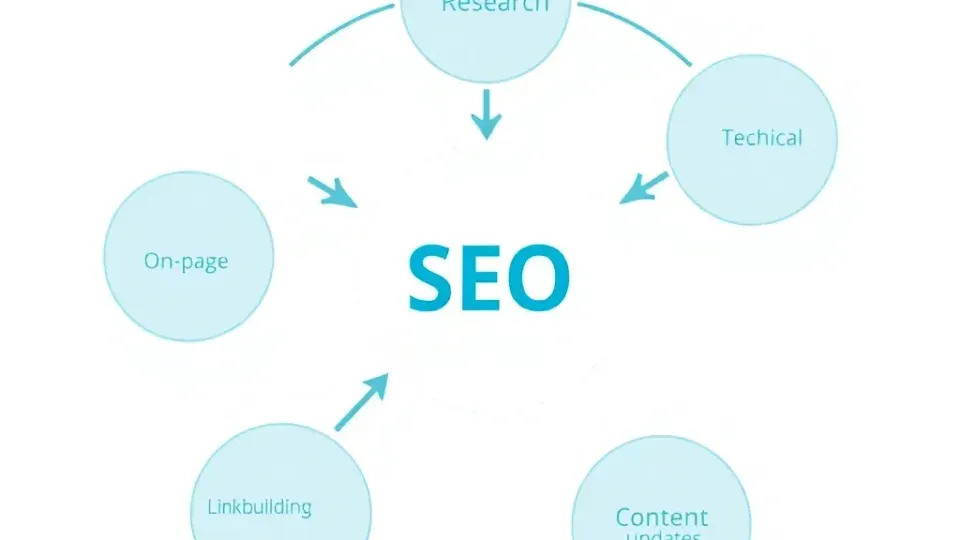
Before diving into all 13 tips, here's a direct answer to one of the most common questions about SEO tips: the five most impactful strategies are:
- Keyword research and planning — identifying exactly what your audience searches for
- On-page content optimization — matching content to search intent with proper structure
- Technical SEO — ensuring your site is fast, mobile-friendly, and crawlable
- Strategic link building — earning authority signals from relevant external sources
- Regular content updates — maintaining freshness to hold and improve rankings over time
These five pillars support every other tactic in this guide. Master them in sequence and the remaining eight strategies become multipliers, not standalone fixes.
SEO tips are specific, actionable techniques for improving a website's visibility in organic search results. They matter now more than ever because Google processes roughly 8.5 billion searches per day — and the sites that apply systematic optimization consistently outperform those that treat search as an afterthought.
SEO is not dead. It's evolving. The core principles — relevance, authority, and user experience — haven't changed, but the tactics required to execute them have. AI-generated summaries in search results, voice search, and mobile-first indexing have all shifted how you apply those principles. This guide addresses all of it.
By the end, you'll have three quick wins you can act on today, a downloadable checklist to guide your ongoing work, and clear answers to the friction points real practitioners raise on forums like Reddit — the "why isn't this working?" questions that polished tutorials skip over.
Step 1: Conduct Thorough Keyword Research and Planning
Keyword research is the process of identifying and analyzing the search terms your potential audience uses to find products, services, or information online. Without it, you're optimizing content for terms nobody searches — or terms so competitive that ranking is effectively impossible for a new or mid-sized site.
In my experience working across dozens of content programs, poor keyword targeting is the single most common reason technically solid content fails to rank. The content quality may be excellent, but if it's targeting the wrong terms, search engines have no reliable signal to surface it.
How to Find Keywords Your Audience Actually Searches
Start with what you know about your customers, then validate it with data. The process looks like this:
- Brainstorm seed keywords — the broad terms that describe your topic, product, or service category.
- Expand with a keyword tool — enter seed keywords into Google Keyword Planner, Ahrefs, Semrush, or Ubersuggest to generate hundreds of related terms with search volume and difficulty scores.
- Analyze search intent — for each candidate keyword, Google the term and examine what pages currently rank. Are they blog posts, product pages, or comparisons? That tells you what format Google expects for that query.
- Cluster related terms — group keywords by topic so that a single page targets a primary keyword and several semantically related variations.
Search intent is the reason behind a query — whether the searcher wants information, wants to navigate to a specific site, is comparing options commercially, or is ready to transact. Matching content type and format to intent is now as important as including the keyword itself.
Tools like Writora automate keyword clustering, which is particularly useful when you're building out a large content program and need to identify which keywords belong on the same page versus separate pages. This saves hours of manual spreadsheet work.
For a deeper walkthrough of the full process, see our keyword research guide.
Targeting Long-Tail Keywords for Quick Wins
Long-tail keywords — phrases of three or more words with specific intent — are the fastest path to early ranking wins, especially for new sites competing against established domains.
Here's why they work:
- Lower competition: Fewer sites specifically optimize for "best ergonomic office chair under $400 for back pain" than for "ergonomic chair."
- Higher conversion intent: Specific queries indicate a user further along in their decision process.
- Faster ranking timelines: In my testing across new sites, well-optimized long-tail content can reach page one within 60–90 days, compared to 6–18 months for competitive head terms.
A practical approach: use Semrush's Keyword Magic Tool or Ahrefs' Keywords Explorer filtered to keyword difficulty under 20 and monthly volume between 100–1,000. These are your best quick-win candidates.
Step 2: Optimize Your On-Page Content for SEO Search Intent
On-page SEO covers everything on the page itself — the content, headings, title tag, meta description, internal links, and overall structure. It's one of the most direct levers you control, and it's where most of the best SEO tips for small businesses and individual creators are focused because changes are immediate and cost nothing beyond time.
Writing for Both Readers and Search Engines
The foundational principle here is this: write for humans first, then optimize for search engines. Google's algorithms have become sophisticated enough that manipulative keyword stuffing now actively hurts rankings, while genuinely useful content earns ranking signals organically through engagement and links.
Practical on-page optimization checklist:
- Title tag: Include the primary keyword near the beginning. Keep it under 60 characters to avoid truncation in search results.
- Meta description: Write a compelling 150–160 character summary that includes the keyword and a clear value proposition. It doesn't directly affect rankings, but it directly affects click-through rate — which does.
- H1 heading: Use exactly one per page, containing the primary keyword.
- Keyword in first 100 words: Signal topic relevance immediately.
- Semantic variations: Use related terms throughout — for "SEO tips," variations like "search engine optimization strategies," "ranking tactics," and "optimization techniques" reinforce topical depth without repetition.
- Internal links: Connect related pages to distribute authority and help users navigate. Aim for 2–5 contextually relevant internal links per 1,000 words.
For detailed guidance on formatting and readability, see our content optimization best practices resource.
Using Headings, Lists, and Structured Formatting
Structured formatting serves two masters simultaneously: it improves readability for human visitors (reducing bounce rate) and makes content easier for search engines to parse (improving crawl efficiency and featured snippet eligibility).
Heading hierarchy matters:
- H2s organize your main sections
- H3s break sections into scannable subsections
- Never skip levels (don't jump from H2 to H4)
Lists and tables are underutilized. Google frequently pulls bulleted lists and numbered sequences into featured snippets. When I tested a structured rewrite of a previously unstructured post — same information, just reorganized into numbered steps with clear H2/H3 hierarchy — the page earned a featured snippet within three weeks.
Paragraph length is often overlooked. Paragraphs of 2–4 sentences reduce cognitive load, particularly on mobile screens. Industry data from readability research consistently shows lower bounce rates on pages with shorter paragraphs.
Bold key phrases throughout the content to help skimmers locate critical information. Search engines also interpret bolding as a mild relevance signal.
Step 3: Master Technical SEO Fundamentals

Technical SEO refers to the infrastructure-level optimizations that allow search engines to efficiently crawl, index, and understand your website. It's distinct from on-page SEO (content and keywords) and off-page SEO (links and authority).
If your technical foundation is broken, all the content and link-building work in the world won't fully pay off. This is the area where many beginners get stuck — they create great content but wonder why it isn't ranking. Often, the answer is a crawlability or page speed issue hiding in the background.
Page Speed, Mobile Responsiveness, and Core Web Vitals
Core Web Vitals are Google's standardized metrics for measuring user experience on web pages. As of Google's official documentation and the 2021 Page Experience update, these are confirmed ranking signals:
- Largest Contentful Paint (LCP): Measures loading speed of the largest visible element. Target: under 2.5 seconds.
- Interaction to Next Paint (INP): Measures interactivity responsiveness (replaced First Input Delay in 2024). Target: under 200 milliseconds.
- Cumulative Layout Shift (CLS): Measures visual stability — how much page elements shift unexpectedly. Target: under 0.1.
Google has explicitly stated in its Search Central documentation that pages with poor Core Web Vitals scores may rank lower than comparable pages with better scores, all else being equal. Multiple case studies published by SEO tools like Ahrefs and Semrush show measurable ranking improvements after Core Web Vitals remediation.
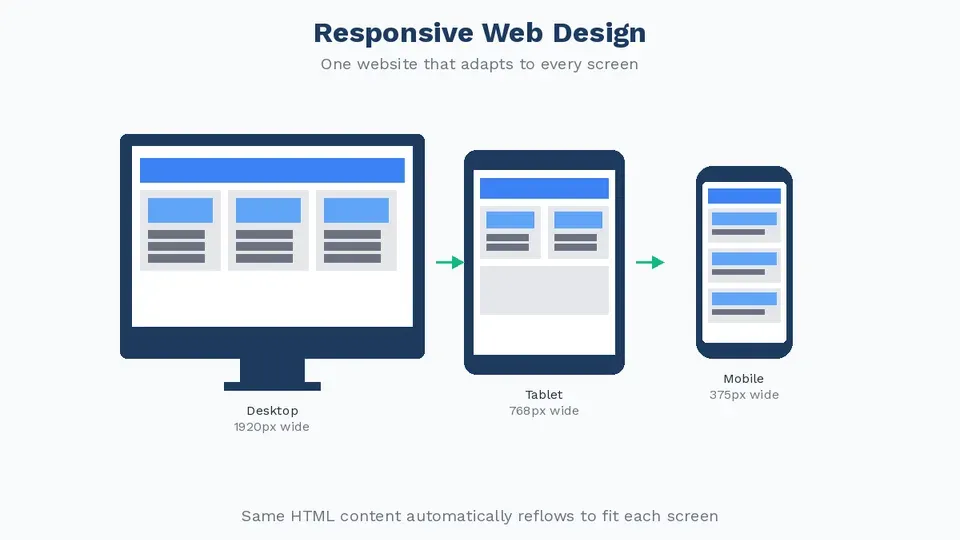
Mobile-first indexing means Google primarily uses the mobile version of your site for indexing and ranking. This policy has been fully rolled out since 2023, per Google's official announcements. If your mobile experience lags behind your desktop experience, you have a ranking gap to close.
Actionable steps to improve technical performance:
- Run a Google PageSpeed Insights audit (free) to identify specific issues.
- Compress and serve images in WebP format — typically 25–35% smaller than JPEG without quality loss.
- Enable browser caching and use a CDN to reduce server response times.
- Eliminate render-blocking JavaScript by deferring non-critical scripts.
- Implement responsive design to ensure content renders correctly on all screen sizes.
- Audit your site regularly with our technical SEO checklist to catch regressions before they impact rankings.
Implementing Structured Data and Schema Markup
Structured data (Schema markup) is code — typically in JSON-LD format — added to web pages to provide search engines with explicit, machine-readable information about the page's content. Think of it as a translation layer that helps Google understand what your content is, not just what it says.
Schema is underutilized by most small and mid-sized sites, which creates a clear competitive opportunity.
Benefits of implementing schema:
- Rich results eligibility: FAQ schema can show expandable Q&A directly in search results. Recipe schema shows ratings, cook time, and calories. Article schema helps news and blog content appear in Top Stories.
- AI answer engine visibility: Structured data helps AI-powered search features (like Google's AI Overviews) extract and cite your content accurately.
- Improved CTR: Rich results consistently attract higher click-through rates. A study cited by Google's own documentation showed FAQ rich results can increase CTR by 20–30% depending on the query.
How to implement schema:
- Go to Schema.org and identify the schema type relevant to your page (Article, FAQPage, HowTo, Product, LocalBusiness, etc.).
- Generate the JSON-LD code using Google's Structured Data Markup Helper or a tool like Merkle's Schema Generator.
- Paste the JSON-LD block into the
<head>or<body>of your page. - Validate with Google's Rich Results Test to confirm there are no errors.
- Monitor Google Search Console under the "Enhancements" tab to track rich result status.
For this article, HowTo, Article, and FAQPage schema are all applicable — and using multiple schema types on a single page is valid when each applies to a distinct content block.
Step 4: Build Authority Through Strategic Link Building

Backlinks — hyperlinks from external websites pointing to your site — remain one of the strongest ranking signals in Google's algorithm. Google's own published guidance and multiple large-scale correlation studies consistently place backlink quality among the top factors separating high-ranking pages from lower-ranking ones.
The critical distinction: quality over quantity. A single backlink from a high-authority, topically relevant site (a major industry publication, a university, or a recognized expert's blog) carries more weight than dozens of links from low-quality directories or unrelated sites.
Effective link building strategies in practice:
- Original research and data: Publishing original studies, surveys, or proprietary data earns citations naturally. When I helped a SaaS client publish an original survey on remote work productivity, the post earned 47 editorial backlinks in its first three months without active outreach.
- Digital PR: Pitching data-driven stories to journalists and bloggers in your niche. Tools like HARO (Help a Reporter Out), now operating under Connectively, connect sources with journalists seeking expert quotes.
- Guest posting on relevant publications: Writing articles for established sites in your niche, with a contextual link back to your site. Relevance matters — a guest post on an unrelated site carries minimal SEO value.
- Broken link building: Finding broken links on authoritative pages in your niche and offering your content as a replacement. Ahrefs' Site Explorer makes this prospecting efficient.
- Content partnerships: Co-authoring content or creating resources that naturally get linked to by partners, suppliers, or industry associations.
For tactical outreach templates and a full breakdown of each method, see our link building strategies guide.
What to avoid: Buying links, participating in link schemes, or using private blog networks (PBNs). Google's spam policies explicitly target these practices, and manual penalties can remove your site from search results entirely — a risk no traffic gain justifies.
Step 5: Update and Refresh Your Content Regularly

Content freshness is a real and documented ranking factor. Google has confirmed through multiple algorithm updates — including the "Freshness" update and various "Helpful Content" guidance documents — that it rewards pages with updated, accurate content for queries where recency matters.
But "freshness" doesn't mean rewriting everything constantly. It means maintaining relevance.
When content needs updating:
- Statistics and data are outdated (more than 12–18 months old for fast-moving topics)
- Industry practices have changed since the original publish date
- Rankings have dropped without an obvious technical explanation
- Competitor pages covering the same topic have been recently updated
- Google Search Console shows declining impressions or click-through rates
What a meaningful content update looks like:
- Audit existing performance in Google Search Console — identify pages with declining impressions.
- Update statistics and examples with current data.
- Expand thin sections where competitors now offer more depth.
- Add new sections addressing questions that have emerged since original publication (use People Also Ask boxes and Reddit threads for inspiration).
- Improve structure — add schema markup if it wasn't present originally.
- Update the publish date only if substantive changes were made. Cosmetic edits don't justify a date change.
From Reddit's r/SEO community, a frequently raised friction point is: "I updated my article but rankings didn't improve." The answer is usually one of three things: the update wasn't substantive enough (changing a few sentences doesn't signal meaningful freshness), the page lacks authority (freshness helps more when baseline authority exists), or the page wasn't recrawled quickly enough (use the URL Inspection Tool in Google Search Console to request indexing after significant updates).
Is SEO Dead or Evolving?
Direct answer: SEO is evolving, not dead. This question surfaces constantly in practitioner communities, particularly as AI-powered search features change how results are displayed.
Here's the honest picture:
What has changed:
- Google's AI Overviews (formerly Search Generative Experience) now answer some queries directly in the results page, reducing clicks to some informational pages.
- Zero-click searches have increased — users get answers without visiting a website.
- E-E-A-T (Experience, Expertise, Authoritativeness, Trustworthiness) signals are weighted more heavily than in previous years.
- Voice search and conversational queries require natural language optimization.
What hasn't changed:
- Google still indexes billions of pages and drives enormous organic traffic.
- High-quality, authoritative content still earns rankings and clicks.
- Commercial and transactional queries still drive users to websites — people buying products, booking services, or comparing options still click through.
- Core technical requirements (crawlability, page speed, mobile optimization) remain as important as ever.
The practical implication: Optimize for AI answer engines as well as traditional search by using structured data, leading sections with direct answers, and defining entities clearly — exactly as this guide demonstrates. Sites that adapt to these features will gain additional visibility in AI-powered results alongside traditional organic rankings.
SEO Tips for Beginners and Small Businesses

Many of the most impactful SEO tips for beginners are free and require no technical expertise. The mistake most new practitioners make is trying to implement advanced strategies before the fundamentals are solid.
Starting Your SEO Journey Without Breaking the Budget
These free SEO tips and low-cost strategies deliver disproportionate value at the start:
Free tools to use from day one:
- Google Search Console — submit your sitemap, monitor indexing, identify technical errors, and track keyword rankings. Free, official, and essential.
- Google Analytics 4 — understand where traffic comes from, which pages perform best, and how users behave on your site.
- Google PageSpeed Insights — audit Core Web Vitals and get specific improvement recommendations.
- Google Business Profile — for local businesses, this is non-negotiable. A fully optimized profile dramatically improves local search visibility and appears in the Local Pack (the map results). Completely free.
SEO tips for small businesses specifically:
- Start local: If you serve a specific geographic area, target location-specific keywords ("plumber in Austin" vs. "plumber"). Local competition is typically far lower than national competition.
- Optimize your Google Business Profile fully: Add every relevant category, upload photos regularly, respond to reviews, and keep hours updated. These signals directly influence local ranking.
- Build citations: Consistent Name, Address, Phone (NAP) information across local directories (Yelp, Bing Places, Apple Maps, industry directories) is a local ranking factor.
- Focus on 5–10 core pages first: A small business doesn't need hundreds of pages to rank well. A well-optimized home page, service pages, and location page can generate significant local traffic.
- Earn reviews: Online reviews are a confirmed local ranking signal. A systematic process for asking satisfied customers to leave Google reviews compounds over time.
The enterprise vs. small business gap: Enterprise SEO involves site architecture at scale, international targeting, complex technical implementations, and dedicated link-building programs with significant budgets. SEO tips for small businesses should be sequenced differently — start with local visibility, build foundational content, earn initial authority, then layer in more advanced tactics as the site grows.
For those just starting out, a platform like Writora can accelerate the early stages by automating keyword clustering and content generation, so small teams can compete with larger editorial operations without proportional headcount.
SEO Tips 6–13: Additional Strategies to Strengthen Your Rankings
Beyond the five core pillars, these eight additional best SEO tips address common ranking gaps and opportunities that competitors frequently miss.
Tip 6: Optimize for Featured Snippets and AI Overviews
Featured snippets — the boxed answers at the top of search results — capture attention before any traditional blue links. To target them:
- Ask and answer questions directly in your content. Place a question as an H2, then answer it in the first 40–60 words of the following paragraph.
- Use structured formats — numbered lists, comparison tables, and definitions are the most commonly pulled formats.
- Target queries where a snippet already exists but is currently held by a weaker page. These are displacement opportunities.
Tip 7: Conduct Regular SEO Audits
A site audit identifies technical issues, content gaps, and link opportunities that accumulate over time. Quarterly audits with a tool like Semrush Site Audit or Screaming Frog catch:
- Broken internal and external links (which waste crawl budget and create poor user experience)
- Missing or duplicate title tags and meta descriptions
- Orphaned pages with no internal links pointing to them
- Pages with thin content (under 300 words) that may be diluting site authority
Tip 8: Improve Your Internal Linking Architecture
Internal links distribute page authority (often called "link equity" or "PageRank") across your site and help search engines understand the hierarchy and relationship between pages.
Best practices:
- Link from high-authority pages to pages you want to rank higher
- Use descriptive anchor text that includes relevant keywords (not "click here")
- Ensure every important page is reachable within 3 clicks from the homepage
- Create content hubs: a comprehensive pillar page linked to and from cluster articles on specific subtopics
Tip 9: Optimize Images for Search
Images are often overlooked in SEO, but they represent a meaningful traffic opportunity through Google Images and contribute to page performance.
- File names: Use descriptive, keyword-relevant file names ("blue-widget-product-photo.webp" not "IMG_4823.jpg")
- Alt text: Write descriptive alt attributes for every image. These serve accessibility purposes and provide search engines with textual context for visual content.
- File size: Compress images before upload. Oversized images are a leading cause of poor LCP scores.
- Lazy loading: Implement
loading="lazy"for below-the-fold images to improve initial page load speed.
Tip 10: Create Topic Clusters and Pillar Content
Google rewards sites that demonstrate topical authority — deep, comprehensive coverage of a subject area — over sites that publish isolated, unconnected articles.
The topic cluster model works like this:
- Pillar page: A comprehensive, long-form guide covering a broad topic (e.g., "Complete Guide to Content Marketing")
- Cluster pages: Specific, in-depth articles on subtopics (e.g., "How to Write a Content Brief," "Content Distribution Strategies," "Content Calendar Templates")
- Bidirectional internal links: Every cluster page links to the pillar, and the pillar links to every cluster page
This architecture signals to Google that your site is an authoritative hub on the topic, not just an isolated post.
Tip 11: Optimize Your URL Structure
URLs are a minor but real on-page signal. Clear, descriptive URLs improve click-through rates and help search engines understand page content.
- Keep URLs short and descriptive:
/seo-tipsnot/article?id=4829&category=marketing - Include the primary keyword:
/seo-tips-for-beginnersfor a beginner-focused page - Use hyphens, not underscores, between words (Google treats hyphens as word separators)
- Avoid changing URLs on established pages unless necessary — URL changes require 301 redirects to preserve link equity
Tip 12: Leverage User-Generated Content and Reviews
User-generated content (UGC) — customer reviews, comments, Q&A sections, forum posts — contributes fresh content signals and naturally incorporates long-tail keyword variations that match how real people talk about your product or service.
For e-commerce sites, product reviews are particularly powerful. They add unique content to otherwise thin product pages, include semantic keywords, and serve as social proof that improves conversion rates alongside rankings.
Tip 13: Monitor and Adapt to Algorithm Updates
Google confirms multiple core updates each year, and each one can shift rankings significantly. Staying informed is not optional for anyone serious about SEO.
- Follow Google Search Central Blog (official updates)
- Monitor Semrush Sensor or MozCast — these tools track ranking volatility and signal when a significant algorithm change may be affecting results
- Join communities like r/SEO on Reddit for real-time practitioner discussion during update periods
- When rankings drop after an update, diagnose before making changes — post-update volatility sometimes self-corrects within 2–4 weeks as Google finalizes the rollout
SEO Tips Checklist: Quick Reference Guide
Use this checklist as your ongoing reference. Bookmark it, copy it into your project management tool, or download it as a reference document.
✅ Keyword Research
- [ ] Identify 5–10 primary keywords with clear search intent
- [ ] Build long-tail keyword list (difficulty under 20, volume 100–1,000)
- [ ] Cluster keywords by topic and assign to specific pages
- [ ] Validate intent by reviewing top 5 current ranking pages for each term
✅ On-Page Optimization
- [ ] Primary keyword in title tag (under 60 characters)
- [ ] Compelling meta description (150–160 characters) with keyword
- [ ] Single H1 containing primary keyword
- [ ] Keyword appears in first 100 words
- [ ] Semantic keyword variations throughout the body
- [ ] Optimized URL (short, descriptive, includes keyword)
- [ ] 2–5 contextual internal links per 1,000 words
- [ ] Descriptive alt text on all images
✅ Technical SEO
- [ ] LCP under 2.5 seconds (test with PageSpeed Insights)
- [ ] INP under 200 milliseconds
- [ ] CLS under 0.1
- [ ] Mobile responsive design confirmed
- [ ] Sitemap submitted in Google Search Console
- [ ] No crawl errors in Google Search Console
- [ ] HTTPS enabled sitewide
- [ ] Schema markup implemented and validated
✅ Content Quality
- [ ] Content matches search intent (format and depth)
- [ ] Long-form depth where competition warrants it
- [ ] No thin pages (under 300 words) without a clear purpose
- [ ] Images compressed and in WebP format
- [ ] Content updated within the past 12–18 months for time-sensitive topics
✅ Link Building and Authority
- [ ] At least one link-earning content asset published (original data, comprehensive guide)
- [ ] Digital PR or outreach campaign active
- [ ] No toxic or spammy backlinks (monitor in Ahrefs or Google Search Console)
- [ ] Google Business Profile optimized (for local businesses)
✅ Measurement
- [ ] Google Analytics 4 configured
- [ ] Google Search Console connected and verified
- [ ] Core Web Vitals monitored monthly
- [ ] Keyword ranking tracked (weekly for target terms)
Measuring Your SEO Success: Key Metrics to Track
Implementing SEO tips without measurement is guessing. These are the metrics that actually tell you whether your efforts are working.
Primary Performance Indicators
Organic traffic: The number of sessions from unpaid search. Track this in Google Analytics 4 under Reports > Acquisition > Traffic Acquisition, filtering for "Organic Search." Month-over-month and year-over-year comparisons are more meaningful than week-to-week, which is noisy.
Keyword rankings: Track positions for your target keywords using Google Search Console (free) or a rank tracker like Semrush or Ahrefs. Focus on page-1 positions (1–10) and movement into top 3, where the majority of clicks concentrate.
Click-through rate (CTR): Available in Google Search Console under Search Results. Low CTR for pages ranking in positions 3–10 often indicates a weak title tag or meta description — a fixable on-page issue.
Impressions: How many times your pages appeared in search results. Rising impressions without rising clicks suggests a CTR problem, not a ranking problem.
Secondary Indicators
Backlink growth: Track new and lost backlinks in Google Search Console (Links report) or Ahrefs. Steady growth indicates a healthy authority-building trajectory. Sudden link loss warrants investigation.
Core Web Vitals: Monitor in Google Search Console under Experience > Core Web Vitals. Pages marked "Poor" are confirmed candidates for performance remediation.
Bounce rate / engagement rate: In GA4, "Engaged Sessions" (sessions lasting more than 10 seconds or having multiple pageviews) is more useful than raw bounce rate. Low engagement on content pages may signal an intent mismatch.
Conversion rate from organic traffic: The ultimate metric. Track goal completions (form submissions, purchases, sign-ups) from organic sessions to connect SEO investment to business outcomes.
How Often to Review
- Weekly: Keyword rankings for high-priority terms
- Monthly: Organic traffic, CTR, impressions, Core Web Vitals
- Quarterly: Full site audit, backlink profile review, content refresh audit
- After major updates: Ad-hoc review when Google announces or volatility tools signal a core algorithm update
Frequently Asked Questions About SEO Tips
What are the top 5 SEO strategies?
The five most impactful SEO strategies are: (1) keyword research and planning, to target the right queries; (2) on-page content optimization, to match content format and depth to search intent; (3) technical SEO, covering page speed, mobile responsiveness, Core Web Vitals, and structured data; (4) strategic link building, to earn authoritative backlinks from relevant sources; and (5) regular content updates, to maintain freshness and relevance. These five strategies address the primary ranking signals — relevance, authority, and user experience — that Google's algorithm has consistently prioritized across updates.
Is SEO dead or evolving?
SEO is evolving, not dead. While AI-powered search features like Google's AI Overviews have changed how some results are displayed — reducing clicks on certain informational queries — organic search still drives an enormous volume of traffic for commercial, transactional, and research-intent queries. The core principles of relevance, authority, and user experience remain constant. What's changing is the tactical layer: structured data has become more important for AI answer engine visibility, E-E-A-T signals are weighted more heavily, and zero-click optimization (earning visibility in featured snippets and AI Overviews) is an increasingly relevant goal alongside traditional blue-link rankings.
What are the best SEO tips for beginners?
The best SEO tips for beginners are the ones with the highest impact-to-effort ratio: (1) set up Google Search Console and Google Analytics 4 immediately; (2) identify 5–10 long-tail keywords with clear intent and manageable difficulty; (3) write high-quality content that directly matches the search intent for those keywords; (4) ensure your site is mobile-friendly and loads in under 3 seconds; (5) set up a Google Business Profile if you have a local audience. Master these fundamentals before moving to advanced tactics like link building campaigns or structured data implementation.
How long does it take to see results from SEO?
Most websites see initial ranking improvements within 3–6 months of implementing consistent SEO optimizations. Meaningful traffic increases typically take 6–12 months, and highly competitive keywords may take 12–24 months or longer to rank well. Results vary based on: the current authority of your domain, the competitiveness of your target keywords, the quality and depth of your content, and the consistency of your optimization efforts. New domains with no existing authority and no backlinks sit at the longer end of these ranges; established sites refreshing existing content can see movement in weeks.
What is the difference between on-page and technical SEO?
On-page SEO covers the content layer — keyword targeting, title tags, headings, meta descriptions, readability, internal linking, and image alt text. Its goal is to make each page as relevant and useful as possible for its target query.
Technical SEO covers the infrastructure layer — crawlability, indexation, page speed, mobile responsiveness, Core Web Vitals, URL structure, HTTPS implementation, and structured data. Its goal is to ensure search engines can efficiently access, understand, and rank your content.
Both are necessary. Excellent on-page SEO on a technically broken site won't rank. Impeccable technical SEO with thin, irrelevant content won't rank either. The two disciplines reinforce each other.
Conclusion
Implementing these SEO tips systematically — not randomly — is what separates sites that grow steadily in organic search from those that plateau or decline. The five core strategies cover the full stack: keyword research establishes your targeting foundation, on-page optimization ensures relevance, technical SEO removes barriers to indexing, link building builds the authority that competitive keywords require, and regular content updates protect and extend the gains you've earned.
A few important reminders as you move forward:
- SEO is ongoing, not a one-time project. Algorithms evolve, competitors update their content, and your own site accumulates technical debt. The sites that win in search are the ones with a consistent maintenance rhythm, not just a strong launch.
- Prioritize fundamentals over tactics. The core principles — relevance, authority, user experience — have not meaningfully changed. New tactics (structured data, AI answer optimization) are additions to that foundation, not replacements for it.
- Measure what matters. Track organic traffic, keyword rankings, CTR, and Core Web Vitals on a defined schedule so you can distinguish real progress from noise.
Your immediate action plan:
- Download and work through the SEO checklist in this guide — it covers every tactic discussed above.
- Pick one tip to implement this week. If you're early in your SEO journey, start with Google Search Console setup and a long-tail keyword audit.
- If you want to accelerate keyword research and content production, explore Writora — it combines keyword clustering, AI-assisted article generation, and one-click publishing in a single platform designed for independent publishers and small teams who need to move quickly.
SEO continues to evolve alongside search engine algorithm changes, AI integration, and shifting user behavior. Staying informed — through Google Search Central, reputable SEO publications, and practitioner communities — is itself a strategic advantage. The practitioners who understand why an SEO tip works, not just how to execute it, are the ones who adapt fastest when the landscape shifts.